The Baselodge Experiment
 Jack Seagrist
What happens when a product manager who has shipped plenty of products, but never actually built one, decides to build a full app himself with AI? You get BaseLodge: an AI camping trip planner, two real users, zero dollars of revenue, and a notebook full of lessons. Here's what I learned.
Table of contents
- Why I built a camping app
- The problem: booking a campsite is broken
- Who else is in the space
- The tech stack (and what it actually cost)
- How I actually built it
- Loading the campsite data (Recreation.gov to Supabase)
- The data model (Supabase Postgres)
- Keeping availability fresh (AWS Lambda + Serverless)
- The AI layer (OpenAI)
- Auth and access control (the part that fought back)
- The main challenges (what 129 deployments taught me)
- Advertising
- Hidden cost
- The lessons that stuck
- 1. We were not solving the core problem well enough
- 2. AI crushes the barrier to entry, which makes validation more important, not less.
- 3. The dev loop is addicting, think before prompting
- What's next
- See it in action
Why I built a camping app
I am a product manager. I started in mechanical engineering, went to Stanford for environmental engineering, and somehow ended up building software products, most recently building product for Flodesk. I have shipped plenty of things in my career, but always with engineers doing the actual building. So this year I gave myself a challenge: find out whether a non-developer like me could build and launch a full-stack app from scratch, with AI as my co-pilot the entire way.
The app is BaseLodge, an AI-powered camping trip planner. Picking camping was not random. If you have ever tried to book a campsite in California, you already know the problem.
So how did it go?
Believing I was a developer for a day: priceless 😎
Woof. Not exactly the $1M ARR overnight everyone will tell you is possible now with AI. For me, the most important lesson was reiterating just how hard building good products can be. AI is another helpful tool in the toolbox, but not a catch all solution. The next sections share a bit more about the journey, enjoy.
The problem: booking a campsite is broken
Here is the question I started with:
Why is it so hard to plan a camping trip?
The pain is real and easy to find. Campers routinely have to book months in advance, only to watch sites sell out within minutes of release. Recreation.gov and ReserveCalifornia are riddled with glitches, lockouts mid-checkout, and 8 a.m. release scrambles. And the cruel twist: plenty of "fully booked" campgrounds sit half empty because of no-shows, while bots snap up the good sites before a normal person has a chance.
On top of the booking mess, the planning is scattered everywhere. People juggle Google searches, TikToks, group texts, physical notebooks, and shared Google Docs just to organize one weekend.
I did not want to guess whether this mattered, so I tried to validate it before going all in:
- Ran a user study to see how people actually plan trips and where they get stuck.
- Read through reviews and forums. I fed Reddit threads, TripAdvisor reviews, and forum posts into AI and let it surface the repeated patterns of frustration instead of trusting my own hunch.
- Scored each problem using the framework below.
- Collected in-app feedback and, eventually, used the app myself on a real trip (which surfaced its own embarrassing list of bugs).
To make sense of it all, I gave AI a structured process to follow (DEEP): Decode the hidden need behind what people actually said, not just their words. Extract the emotional signals and trigger words like "always," "never," and "can't." Examine the patterns by grouping similar complaints and linking them back to what people actually did. Then Prioritize each insight with a simple formula: how often it came up, times how intense the frustration was, times potential business impact, scored 1 to 100. That turned a pile of Reddit threads, TripAdvisor reviews, and interview notes into five ranked problems.
Three questions did most of the work in the Prolific study:
What tools do you use to help you plan camp trips today?
If you could only pick one thing, what would your ideal camping app help you do?
The results were pretty clear. Real-time campsite discovery and booking scored a 95 out of 100 on my impact scale. Fragmented planning came in around 80, and collaborative trip coordination around 78. This confirmed that others felt the same pain as us when trying to plan a camping trip.
Who else is in the space
Before building, I mapped the competition. It turns out the camping space is crowded, but lopsided:
| Tool | What it does | The gap |
|---|---|---|
| Campflare | Free cancellation alerts | Alerts only, no planning |
| Campnab | Paid cancellation monitoring | Alerts only |
| Arvie | Aggregates 36+ booking sites, Auto-Book | Booking only |
| Campspot | Reservations ($1.9B booked in 2023) | No trip planning |
| Hipcamp | Marketplace, 140k+ sites, $97.5M raised | Booking, not personalized planning |
| The Dyrt | Reviews + PRO alerts ($60/yr) | No AI planning |
Almost everyone competes on alerts or booking, and nobody was focused on planning the whole trip. That became my value proposition:
Campflare tells you when a spot opens up. We help you plan the whole trip around it.
So BaseLodge leaned into the gaps: AI trip planning, group coordination (invite friends, vote on sites, share itineraries), a calm and modern interface, and an AI search that understands what you actually want instead of matching keywords.
The tech stack (and what it actually cost)
I wanted a stack that was modern, cheap to start, and friendly to an AI co-pilot. Here is what I landed on:
| Layer | Tool | What it did |
|---|---|---|
| Frontend | Next.js on Vercel | The web app and hosting |
| Backend | FastAPI (Python) on Render | API for search, trips, packing lists |
| Database + Auth | Supabase (Postgres + pgvector) | User data and vector embeddings |
| Maps | Mapbox | The explore map and trip maps |
| AI | OpenAI | Embeddings + summaries and ratings |
| Campsite data | Recreation.gov RIDB API | Federal campground data |
| Cron jobs | AWS Lambda + EventBridge • Serverless | Pulling availability on a schedule |
| Dev tooling | Cursor | My AI pair programmer |
The fun part is how little this costs at the 0-1 stage, since most of it runs on free tiers. Here's the breakdown:
| Tool | Cost |
|---|---|
| Mapbox | Free |
| Vercel | Free, then $25/mo for the pro plan |
| GitHub | Free |
| Recreation.gov API | Free |
| OpenAI | ~$10/mo cap |
| Supabase | $25/mo (later back to free) |
| Google Cloud (OAuth) | Free |
| Cursor | $20/mo |
| Render | Free |
| AWS Lambda | Pennies (usage-based) |
| Namecheap domains | $36/yr |
| Meta ads | $20 test campaign |
How I actually built it
Most of the build was a back and forth conversation with AI. I used Cursor as an AI pair programmer, and the app came together as four moving parts that talk to each other through Supabase: a Next.js frontend on Vercel, a FastAPI backend on Render, a Supabase Postgres database for auth and data, and an AWS Lambda crawler that keeps campsite availability fresh.
A few things I am proud of:
- I used Cursor's MCP connection to Supabase to bulk-load every Recreation.gov site into the database and clean it up, instead of hand-writing migrations one at a time. This is the kind of grunt work AI is genuinely great at.
- I built the AI search myself. When you describe your ideal trip ("a quiet lakeside spot with good fishing"), the app finds campgrounds that match what you meant, not just the keywords you typed. More on how that works below.
- I shipped a freemium model with limits on the number of trips and AI searches, then deployed the frontend on Vercel, the backend on Render, and scheduled availability jobs on AWS Lambda.
The data flows in a loop. Scripts pull every campground from the Recreation.gov API into a Supabase facilities table. A scheduled Lambda sweeps those facilities for availability and writes the results back to Supabase. The frontend and backend read from Supabase, and OpenAI sits on top to generate packing lists and power semantic search. Here's how the main pieces fit together.
Loading the campsite data (Recreation.gov to Supabase)
The very first job was getting real campground data into the app. I used Cursor's MCP connection to Supabase so I could inspect the schema and the data conversationally while I wrote the loader, instead of hand-writing migrations blind. The script walks the Recreation.gov RIDB API in batches of 50 (filtered to camping), pulls the extra detail for each facility, and upserts it into Supabase keyed on facility_id so re-runs update rather than duplicate. It processes a batch a minute to stay under the API's rate limits.
// updateFacilities.js - page the RIDB API, then upsert into Supabase
const url = `https://ridb.recreation.gov/api/v1/facilities?limit=50&offset=${offset}&activity=CAMPING`;
const { RECDATA } = await (await fetch(url, { headers: { apikey: RIDB_API_KEY } })).json();

for (const facility of RECDATA) {
  const details = await fetchFacilityDetails(facility.FacilityID);
  await supabase.from('facilities').upsert({
    facility_id: facility.FacilityID,
    name: facility.FacilityName,
    description: details.FacilityDescription || '',
    state: facility.FacilityStateCode || '',
    lat: facility.FacilityLatitude,
    lon: facility.FacilityLongitude,
    activities: facility.ACTIVITY || [],
    source: 'recreation_gov',
  }, { onConflict: 'facility_id' });
}
The data model (Supabase Postgres)
The campsite data lives in two core tables. Every Recreation.gov facility gets a row in facilities, and the availability the crawler collects lands in availability_results, one row per facility per month:
create table facilities (
  id uuid default gen_random_uuid() primary key,
  facility_id text unique not null,
  name text not null,
  description text,
  state text,
  lat numeric,
  lon numeric,
  activities jsonb default '[]'::jsonb,
  source text default 'recreation_gov'
);

create table availability_results (
  id uuid default gen_random_uuid() primary key,
  facility_id text not null,
  month_date text not null,
  availability_data jsonb not null,
  last_updated timestamptz default now(),
  unique (facility_id, month_date)
);
Keeping availability fresh (AWS Lambda + Serverless)
The trickiest infrastructure piece was pulling live availability without getting rate-limited by Recreation.gov. I used the Serverless framework to define a small set of Lambda functions: an HTTP trigger, a worker, and a health check. The worker runs with reserved concurrency of 1 so runs never overlap, with a dead-letter queue for failures:
worker:
  handler: lambda/worker.handler
  timeout: 900
  memorySize: 2048
  reservedConcurrency: 1
  deadLetterQueue:
    targetArn:
      Fn::GetAtt: [WorkerDLQ, Arn]
The worker paginates through facilities using a rolling cursor stored in Supabase (crawler_state.last_offset), so each scheduled run picks up where the last one stopped. It handles the two errors Rec.gov throws constantly: a 404 marks a facility as unsupported so future runs skip it, and a 429 respects Retry-After and backs off with jitter. Without that backoff logic, the crawler would have gotten my IP throttled pretty quickly.
The AI layer (OpenAI)
Two features lean on OpenAI. The first is semantic search: when you describe your ideal trip, the backend turns that into an embedding, compares it against an embedding for every campground stored in Supabase, and returns the closest matches by vector similarity. It matches on meaning, so "tranquil waterfront camping" can surface a site described as "peaceful lakeside" with zero shared keywords. The second is AI packing lists, generated from the trip type, group size, duration, location, season, and experience level, so a three-day backpacking trip in October gets a different list than a car-camping weekend in July.
Under the hood, the search endpoint embeds the user's text with the same model, then hands the vector to a Postgres function that ranks campgrounds by cosine distance:
# /recommend-facility
query_embedding = client.embeddings.create(
    model="text-embedding-ada-002",
    input=user_input,
).data[0].embedding

# match_facilities: select id, name, summary from facilities order by embedding <=> query limit 3
response = supabase.rpc("match_facilities", {
    "query_embedding": json.dumps(query_embedding),
}).execute()
Auth and access control (the part that fought back)
Auth was email and password plus Google OAuth through Supabase. The interesting decision was access control. I started with Postgres Row Level Security on every table, but the collaboration policies kept triggering infinite recursion (trips check collaborators, collaborators check trips). After too many loops with the AI handing me the same recursive policies, I made a judgment call: disable RLS on the main tables and enforce access in the application layer instead (Worth flagging: this only works because the frontend never talks to Supabase directly, it goes through the FastAPI backend, which is where these checks actually live. If the frontend had a direct line to Postgres, skipping RLS would be a real hole).
// only allow access if the user owns the trip or is an accepted collaborator
if (
  tripData.user_id !== session.user.id &&
  (!collaboratorData || collaboratorData.length === 0)
) {
  router.push('/dashboard');
  return;
}
The main challenges (what 129 deployments taught me)
I shipped 129 deployments to production, and a large share of them failed before they went green. The failures were not random. They clustered around the same handful of issues, over and over:
- The apostrophe saga. My single most common failed build, by a mile. AI-generated JSX kept slipping in unescaped apostrophes and smart quotes that broke the Next.js build. My commit history is a graveyard of "fixed apostrophe," "fixed quotes," and "fixed apostrophes in terms and privacy pages," stretching from May all the way to October.
- Google OAuth redirect loops. Login fought me for weeks: a circular redirect on sign-in, and at one point two competing login files. Auth was one area where the AI sounded confident and was often wrong.
- Supabase RLS recursion. The access-control story above cost real hours before I stopped fighting it and changed the approach.
- Lambda and Node runtime. Bumping Node versions, getting the Lambda zip to deploy, and pacing requests around Rec.gov's rate limits each took multiple tries.
None of these were exotic, just boring bugs that the AI kept reintroducing.
Advertising
There is a pattern for this kind of test that shows up across a lot of startup advice: before you build anything real, put up a landing page, a mocked-up product, and a small amount of paid traffic, then see if anyone tries to buy. It gets called different things (a "fake door" test, a zero-cost MVP), but the mechanics are the same.
BaseLodge's ad campaign was basically that, just run after the product already existed. I wanted a real signal instead of a guess, so I ran a single paid experiment: a $20, four-day Meta ad campaign in July 2025, promoted from our business Page, Climbcovers, well under the $50 budget that version of the framework usually calls for.
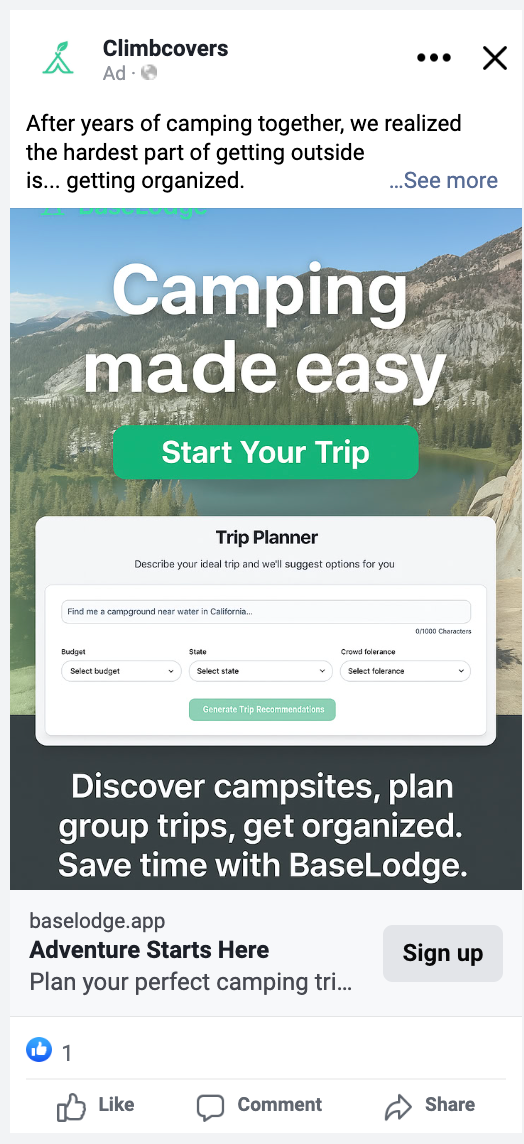
The creative was simple: a mountain-lake hero image, the line "Camping made easy," a mocked-up version of the actual AI trip planner embedded right in the ad so people could see the product before ever clicking, and a close with "Discover campsites, plan group trips, get organized. Save time with BaseLodge."
| Metric | Result |
|---|---|
| Budget / duration | $20 over 4 days |
| Link clicks | 45 |
| Cost per link click | $0.43 |
| CTR (all) | 0.35% |
For comparison, here's where Meta ads typically land: average CTR across industries runs somewhere in the 1.4% to 2.2% range, and most benchmark reports treat anything under about 0.7% as a sign the creative or audience is not connecting. BaseLodge's 0.35% CTR sits below that line, which tells me that leading with "getting organized" as the pain point wasn't grabbing most people's attention. The one bright spot: $0.43 per click is actually cheaper than the typical $0.70 to $1.72 range for traffic campaigns, which means the auction was not competitive for this audience. So when people did click, it was cheap. The problem was getting more of them to click in the first place, which points to the ad itself rather than the budget.
The surprising part was who actually showed up. My brand notes going in assumed Gen Z and Millennial campers, but the results skewed 73% men to 27% women, and the strongest engagement by far came from men aged 55 to 64, with the 65+ bracket a close second for both genders. Cost per result was also cheaper for men ($0.38) than women ($0.56).
For $20, that is a real, if small, data point: my assumption about who wants an AI camping planner was wrong. A 45-click, four-day test proves nothing at a statistical level, but it is exactly the kind of cheap signal that should shape the next round of creative and targeting before spending real money on it.
Hidden cost
Money is not the only cost. Every one of those late-night sessions with Cursor, chasing an architecture fix or hunting down an apostrophe bug, ran through a large language model, and each of those calls has an energy and water footprint. Published estimates vary wildly: OpenAI's own figure puts a query at about 0.34 watt-hours and 0.3 milliliters of water, while an independent UC Riverside estimate puts a similar request closer to 140 watt-hours and 519 milliliters. That's roughly a 400x gap on energy and a 1,700x gap on water, so nobody really agrees on the numbers yet.
Months of near-daily Cursor sessions, chasing 129 deployments and plenty of dead ends along the way, plausibly adds up to several thousand of these calls. Even at that scale, the range does not resolve into a real number, since the companies running these models do not publish true per-query costs. My best guess leans toward the low end, but I'd rather show the range than make up a number.
The lessons that stuck
1. We were not solving the core problem well enough
This one is harder to admit. The single biggest pain point I validated at the start was booking: real-time discovery and reservations scored the highest on my impact framework, by a wide margin. But actually getting a reservation runs into a hard technical wall. Recreation.gov and ReserveCalifornia control the booking flow itself, and a third party like BaseLodge cannot book on someone's behalf without working around that wall entirely. Campflare and Campnab already chip away at the one piece of this that is technically approachable from the outside: cancellation alerts.
My working hypothesis was that I could route around the booking wall by winning on the other two problems instead, fragmented planning and collaborative coordination, solved with a better interface. Building the product did not confirm that hypothesis. A slicker UI for planning and coordination is a nice-to-have, not a reason for someone to abandon Recreation.gov entirely. I also assumed the government sites themselves had a bad interface I could beat. More testing showed that assumption was wrong too. Recreation.gov's interface is good enough for what people actually need it to do; the friction is the booking mechanics underneath it, not the screen.
A better prompt wouldn't have caught this. What I needed was smaller, cheaper iterations and more conversations with actual campers before I built anything.
2. AI crushes the barrier to entry, which makes validation more important, not less.
This is the lesson I learned the expensive way. Because you can whip up almost anything now, it is dangerously easy to spend a month building a fancier and fancier prototype that nobody ends up using. I had a beautiful app and two users, and that came down to skipping validation.
For 0-1, the move is not to go all-in on bells and whistles. It is to use AI as a tool to validate the problem and reach customers faster. David Cramer, who built Sentry into a $3B company, framed it well in First Round's profile on Sentry: "Being bootstrapped forces you to validate with the customer." I think the same applies here. Building is cheap now, so the hard part is proving someone actually wants what you're making.
One more wrinkle I did not expect: even distribution is changing. In an experiment by Ahrefs, AI search tools confidently repeated invented details about a brand that did not exist, because in AI search, the most detailed story wins, even if it's false. For a tiny app like BaseLodge, that's worth keeping in mind. If you don't publish a clear, specific story about your product, the models might make one up for you.
3. The dev loop is addicting, think before prompting
I will be honest: chatting back and forth with a bot until a full website appears is addicting. You feel like a real developer. But the AI does not always hand you the best option, and it will happily let you avoid the hard thinking.
I lost real hours asking it for "the best architecture" or "the right way to do this," only to get the same confident answer looped back at me. You can see it in my deploy history. The same classes of bug kept coming back because the model kept regenerating them: unescaped apostrophes and smart quotes that broke the Next.js build over and over, a Google OAuth flow that looped on itself until I untangled two competing login files, and the RLS policies that recursed no matter how many times I asked for a fix. The model was happy to hand me the same broken pattern again; it was never going to make the call to step back and change the approach. That part was on me.
The takeaway: think the problem through first, then use the AI to execute, and iterate. Mike Krieger's daughter put it best, as relayed by Lenny Rachitsky: "You can ask Claude, but I know I'm right." Keep that posture. Don't outsource all cognition to AI; maintain the ability to think independently and verify.
It is not just a feeling, either. The New York Times reported on a Wharton study where people wrote advice using either a normal Google search or an AI-generated summary. The AI group came back with generic, obvious tips; the search group, forced to actually dig, came back with sharper and more specific advice. Building BaseLodge felt a lot like that study. The AI's answer was always right there, and it was usually the shallower one.
What's next
BaseLodge only has two users, but my main goal was to prove to myself that I could take an idea from zero to a deployed, AI-powered product, and to learn where AI actually helps versus where it lets you skip the work that matters. Next time, I am flipping the order: validate first, build second, and let the AI do what it is best at once I actually know what I am building. Thanks for reading!
See it in action
Video 1:
Video 2:
Video 3:
Video 4: